
The PhotonOS-based appliance allows you quickly deploying the software by Folding@Home running protein folding calculations using your available CPU/GPU resources to help fighting COVID-19. Deploying the OVA gives you different set of options: In the end, looking like: Want to know more? Read the official…
Blog
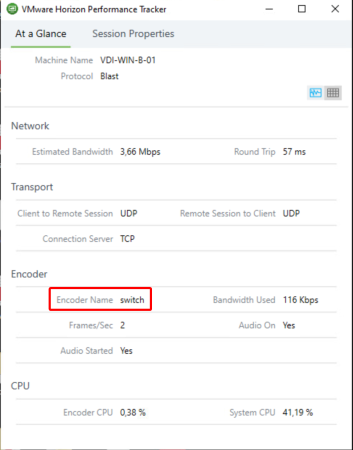
VMware Horizon 7.10 – released on September 17, 2019 – ships with a new dynamic encoder. Depending on what content you’re watching to in your VDI, it will seamless switch to the best suiting codec for optimal performance/quality-balance. While H.264 is ideal for rapidly changing contents like videos, JPG/PNG offers better quality for more static content like Office applications. Overall: Neat stuff! As of this release the "switch"-Codec is disabled by default and must be explicitly enabled via registry. Also make sure you’re using Horizon Client 5.2 or later to make the codec work.

The new Log Insight 8.0 release brings some cool new things: The OS of the whole appliance is replaced with Photon OS 3.0 instead of SUSE (in-place update possible!), the Windows agent is being open-sourced and brings various improvements to content packs. To read more you can check out the release notes or the official blog post. However when I’ve went ahead upgrading my Log Insight instance the upgrade process ran into a timeout. The Web UI as well as SSH were not reachable anymore. The whole node was dead network-wise, while the appliance itself ran just fine. Sherlock’s conclusion: Something went wrong, obviously.
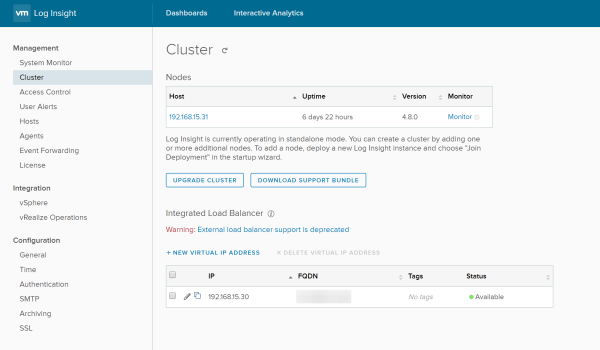
How to change the IP address of a VMware vRealize Log Insight node? Glad you asked! I’ve done this change a few weeks earlier to be able to take use of the recommended "Integrated Load Balancer" (in short ILB) while re-using the existing node IP address for the Virtual IP address, mainly for backwards-compatibility reasons like already deployed agents.
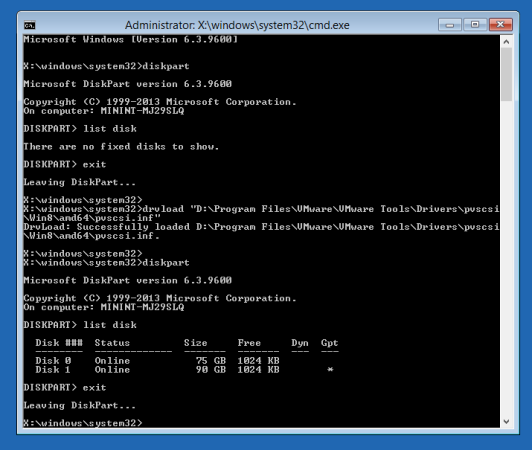
I have a bunch of Windows Server VMs running in a VMware vSphere HomeLab. After nearly about three months of uptime, FreeNAS decided for yet some unclear reasons to crash completely (probably a kernel panic). End of the story: Windows installation was completely broken. Not booting anymore. Apparently the crash ocurred during update installation (perfect timing!). To get the VMs back running I needed to change a few things using the Windows recovery mode. However diskpart showed: "There are no fixed disks to show". Wondering why? Me too!
Am 15. November 2016 veröffentlichte VMware eine neue Version von VMware vRealize Operations Manager 6.4 (kurz: vROPS) mit Verbesserungen, neuen Dashboards und auch eine Unterstützung für das ebenfalls neue vSphere 6.5. Genaueren Release Notes finden sich hier. Neugierig wie ich bin, wollte ich gleich meine vROPS-Installation von 6.3.0 auf 6.4.0 aktualisieren. Leider schlägt schon die Aktualisierung des Betriebssystems der virtuellen Appliance fehl. Zwar mit dem – relativ wenig aussagenden – Fehler: Failed - upgrade.pak.failed.casa_orchestrator Im Netz lässt sich leider kaum etwas dazu finden. Auch die “Pre-Update System Validation” meldet keinerlei Fehler – alles sei in Ordnung. Die abgebrochene Update-Installation sagt aber etwas anderes.

Standardmäßig kann die Bash-Shell der VMware vCenter Server Appliance 6.0 nur für maximal 86400 Sekunden – also 24 Stunden – aktiviert werden. Nach dem Ablauf wird die Bash-Shell wieder deaktiviert und die eingebaute limitierte “ApplianceSh”-Shell verwendet. In älteren VCSA 6.0-Versionen gab es hier einen Trick, indem man das Timeout einfach auf den Maximalwert einstellte, welcher etwa 68 Jahre entsprach. Dieser funktioniert in den neueren Versionen leider nicht mehr:

Veeam Backup & Replication ist eine sehr tolle und umfangreiche Software zum Sichern von Hypervisors wie VMware ESXi oder Microsoft Hyper-V. In den vergangenen Wochen hat mich Veeam jedoch mit einem Problem ratlos gemacht: Veeam konnte meine zwei Microsoft SQL Server 2014 Service Pack 1 in einer Always-On-Gruppe einfach nicht sichern, obwohl diese offiziell von Veeam unterstützt werden. In der Verwaltungsoberfläche trat immer folgender Fehler auf: “VSSControl: Failed to freeze guest, wait timeout” (siehe ebenfalls im Screenshot 1) Zur groben Übersicht, so sah die minimalistische Umgebung aus: 1x VMware ESXi 5.5 U2 1x VMware vCenter 5.5 U2 1x Veeam Backup and Replication v8 (v8.0.0.20121) 2x Microsoft SQL Server 2014 SP1 in zwei eigenen virtuellen Maschinen beide Nodes in einer Always-On-Gruppe AOG erreichbar unter DNS “sqlcl-vcenter.domain.local” Woran das nun liegen könnte?

Durch die Umstrukturierung meiner privaten IT-Umgebung Zuhause wollte ich zugleich meine vorhandene VMware ESXi-Installation auf meinem HP MicroServer Gen8 aktualisieren: Nämlich von der Version 5.5 Update 1 auf 5.5 Update 2. Als Installationsmedium kam die von HP angebotene ESXi-ISO mit den dazupassenden Treibern zum Einsatz, welche auf der HP-Webseite zum Download bereit steht. Die Firmware der Hardware und vom iLO befand sich auf dem Stand des “HP Service Pack For ProLiant” vom Mai 2015. Also, nun einen USB-Stick aus meinen unendlich tiefen Schrank voller IT-Zeug geholt, mit Hilfe von Rufus die vorhin heruntergeladene ISO auf einen USB-Stick gepackt und die HP-Kiste davon gebootet. Nach der Auswahl der richtigen Festplatte mit der ESXi-Installation und der Angabe, dass ein “Upgrade” gewünscht ist, wird nun das “System gescannt“… Aber genau hier war nun auch Schluss. Nach wenigen Sekunden tauchte dann folgende Fehlermeldung auf: ValueError: Cannot merge VIBs Mellanox_bootbank_net-mst_2.0.0.0-1OEM.550.0.0.472560, Mellanox_bootbank_net-mst_2.0.0.0-1OEM.550.0.0.472560 with unequal payloads attributes ([net-mst: 8.250 KB], [net-mst: 8.242 KB]) Es scheinen sich anscheinend zwei VIBs mit denselben Versionen auf dem vorhandenen ESXi und der 5.5U2-ISO zu befinden, welche unterschiedlich groß sind. Dadurch scheint der ESXi-Installer etwas verwirrt zu sein. Das war dann natürlich nicht so erfreulich. Aber zum Glück gibt es ja die Freund und Helfer: Die Suchmaschinen. Meist gibt es dann auch andere Personen aus der IT-Welt, die ein ähnliches oder gar das selbe Problem hatten und bei meiner Problemstellung, war das glücklicherweise der Fall…